



How it works
One idea runs through FitCraft: a small, clear action every day beats an ambitious plan you abandon.
The daily loop
Five steps. Every day.
Every visit ends with a realistic next action rather than a dashboard. The loop repeats daily — one missed day never wipes out your progress.
Discover
Open Home for stories and posts from your people, or Today for one realistic thing to do.Act
Record any sport live, or do a GymCraft workout or YogaCraft practice.Understand
Review your food and activity for the day, or ask the AI companion.Connect
Check in with your club, give kudos, or ask an expert a question.Return
See your next action and your next milestone. Then the loop repeats.
One connected record
Record once. Use it everywhere.
A walk you record counts towards your club task, appears in your weekly summary and can become a feed post — without entering it three times.
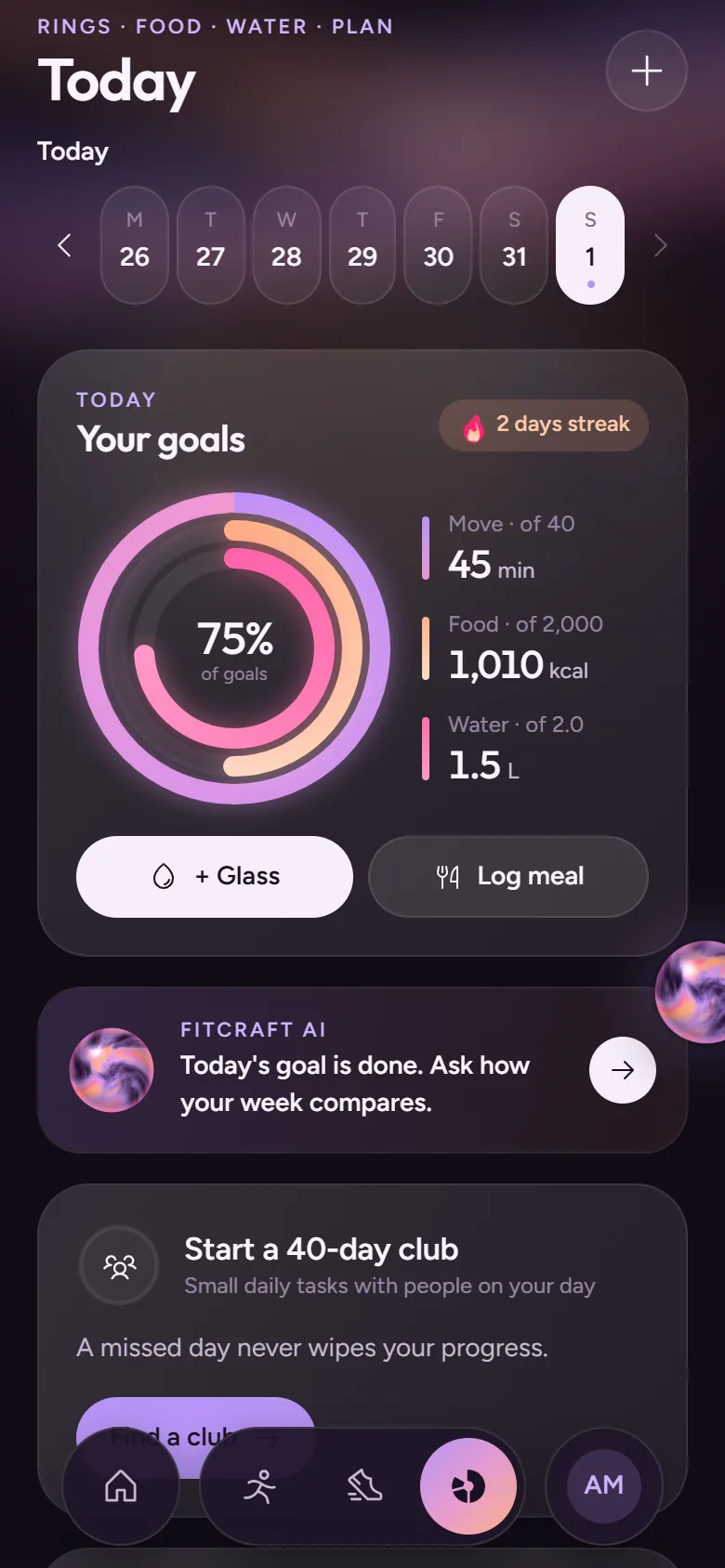
Inside the app
Five tabs. Nothing hidden.
A mobile-first app built around one reliable journey: sign up, complete an activity, save progress, join a club and, if you like, share it.
Home
The social feed: stories, posts from people you follow and your clubs, kudos and comments.Record
Any sport, live: GPS, Bluetooth machines, sets, rounds or heart rate — or add one by hand.Vault
Optional, in preview: balances, sneakers, marathons and the marketplace.Today
Rings for move, food and water, an AI nudge, your plan and sessions.You
Your profile, progress, clubs, history and settings.
Getting started
Two minutes to set up. Then one clear step.
- 01
A few questions
Display name, goal, experience, preferred movement, the time you have and your food preference. Body measurements are optional.
- 02
A starting point
FitCraft suggests a first session and a free 40-day club that fit your answers.
- 03
Consent, asked separately
Before your private records are used in AI answers or social sharing, FitCraft asks — each one on its own.
An example journey
A beginner picks home fitness and vegetarian meals during onboarding. They join a 40-day consistency club, finish a short beginner session, log lunch and review their day. Their club shows members at days 10, 20 and 30. They share a completion card — while their weight and food diary stay private.
An example first day
A day with FitCraft.
Sign up · Create your account
Email sign-in with a one-time code. Tell us your goals, experience and equipment — all optional.07:00 · See today’s step
Today shows one movement task and one habit, sized for a beginner.13:00 · Log a meal
Search the dish or take a photo. Check the estimate, then save.18:30 · Go for a walk
Record it with GPS. Distance, time and pace go into your record.21:00 · Check in
Tick off the habit and, if you like, share a check-in with your club.
Honest data
Every number says where it came from.
FitCraft labels each value so you know how much to trust it. Estimates are never presented as measurements.
- 01Label: Recorded
Recorded
Measured by the app or a connected device — for example GPS distance and moving time. - 02Label: Self-reported
Self-reported
Entered by you — a manual activity, a habit tick or your weight. - 03Label: Estimate
Estimate
Calculated or inferred — photo food estimates and calories burned. Always shown as approximate.
Trust levels
How an activity was recorded decides what it earns.
Every activity carries a trust level. It’s shown on the activity, and the Vault uses it to decide whether the activity earns.
- 01Earns in full
Device
A watch, heart-rate strap or Bluetooth gym machine measured it. - 02Earns in full
GPS
Recorded live with the phone’s GPS and checked for plausible speed and gaps. - 03Earns less
In-app timer
Timed in the app with no sensor: $ProFit at 60% of the rate, no BurnCredits. - 04Earns nothing
Self-reported
Typed in by hand. It is saved to your history but earns nothing in the Vault.
Private by default
Your food diary, weight and measurements are never shared unless you choose to share them. Sharing a completion card is separate from your private records.